
A technically well-executed VR application does not automatically guarantee a pleasant user experience. User comfort is influenced by many factors, including locomotion methods, user interfaces, and interaction design. Well-designed solutions reduce the user’s cognitive load, support immersion, and allow users to focus on the experience itself rather than on learning the interface and controls.
This article examines the role of user-friendliness in creating a positive VR experience. Through practical examples, it identifies design practices that contribute to an intuitive and enjoyable user experience and compares them with the solutions implemented in the MRI training application developed as part of the DTRIP4H project.
This article was not created in commercial collaboration with any of the games or game developers discussed. The observations and conclusions presented are based solely on independent analysis and practical experience.
What Does Extended Reality Mean?
XR technologies have developed rapidly over the past decade. XR (Extended Reality) serves as an umbrella term for technologies that combine the physical and digital worlds (JAMK, 2023).
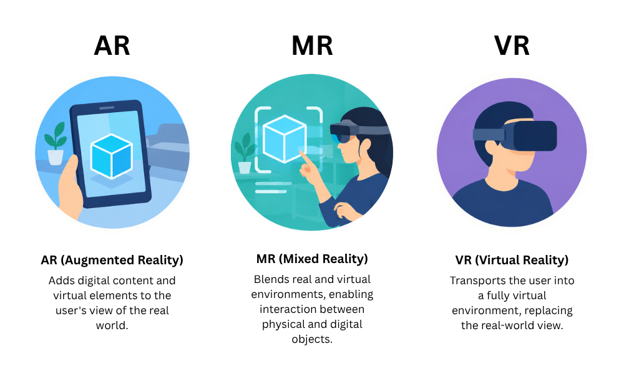
The term extended reality refers to all environments in which the real world and the virtual world intersect. These include Augmented Reality (AR), Virtual Reality (VR), and Mixed Reality (MR) (Rudnäs 2019). Figure 1 illustrates the key differences between these technologies.
DTRIP4H: MRI VR
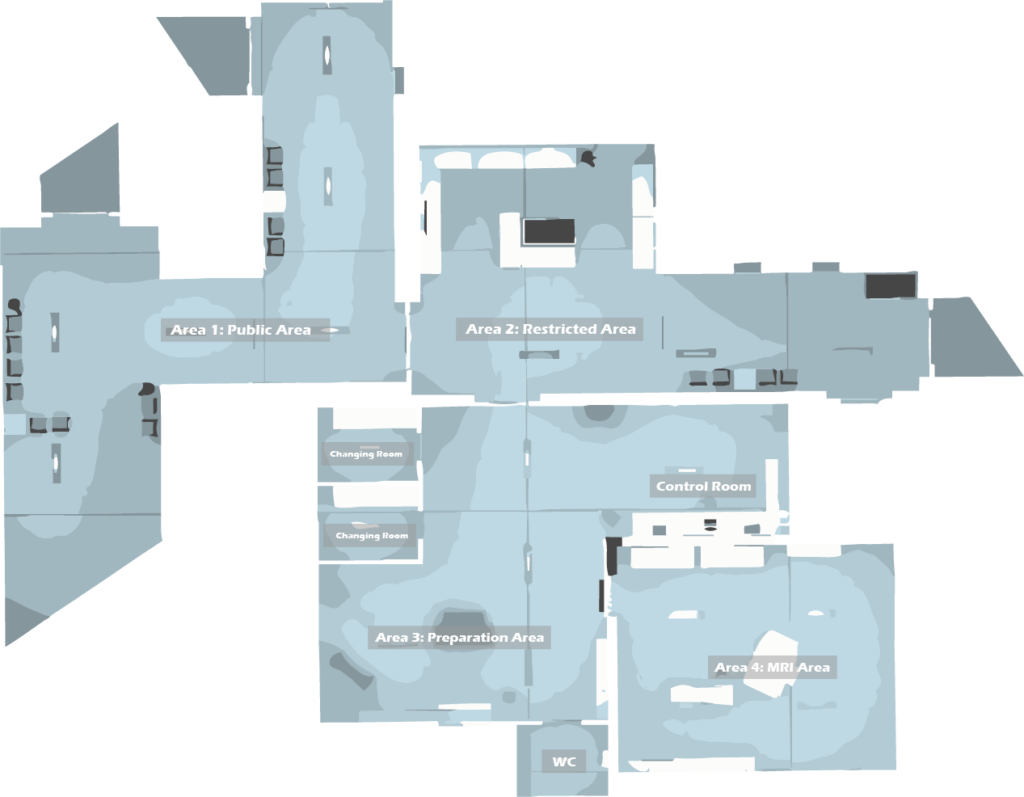
In Use Case 1 of the DTRIP4H project, a VR application is being developed using the Unity game engine to model and simulate a Magnetic Resonance Imaging (MRI) environment in virtual reality (FrostBit 2026). The purpose of the application is to teach MRI safety zones and allow users to act as radiographers or other healthcare professionals throughout the entire MRI process, from patient identification to operating the MRI scanner and completing the examination. The MRI safety zones are divided into four areas: the public area, restricted area, preparation area, and the MRI area itself. These zones are illustrated in Figure 2 below. The safety requirements increase progressively when moving from Zone I toward Zone IV.
In addition to this application, the DTRIP4H project is developing a separate VR experience in which the player takes the role of a patient and goes through the entire MRI examination process from registration to the completion of the scan.
What Can Be Learned from Commercial VR Applications?
Let’s examine a few examples of VR applications available on Steam and the Meta Store. I Am Cat, TAXI DRIVER VR, Job Simulator, and Ghost Town were selected for this review because of their diverse designs, representing different types of virtual environments and interaction methods. These applications include vehicle-based gameplay, hand-driven object manipulation, environmental exploration, and narrative-driven progression. The goal is not to compare the applications against one another, but rather to identify common design practices that contribute to a comfortable and user-friendly VR experience.
Job Simulator – Working in VR
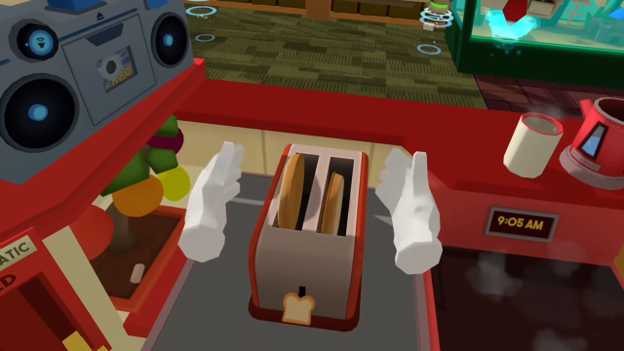
Job Simulator, released by Owlchemy Labs in 2016, is a single-player VR game in which players work as a cashier, office worker, or restaurant employee. Instead of controller models, the game uses virtual hands, making interactions with objects and characters feel more natural.
Buttons are pressed through direct physical contact rather than raycast-based interaction. Players can manipulate levers, switches, and buttons using natural hand movements. As developer Alex Schwartz explained in a Meta Horizon blog post, the team’s goal was to make gameplay as smooth and intuitive as possible (Meta 2017).
Interactive objects are highlighted with a visual emphasis effect, helping players identify which objects can be interacted with. The player does not move around the environment freely. Instead, they are transported from one scenario to another using screen fading transitions while remaining physically stationary throughout the gameplay session. This design choice helps reduce the risk of VR-induced motion sickness.
Taxi Driver VR – Driving a Taxi in VR
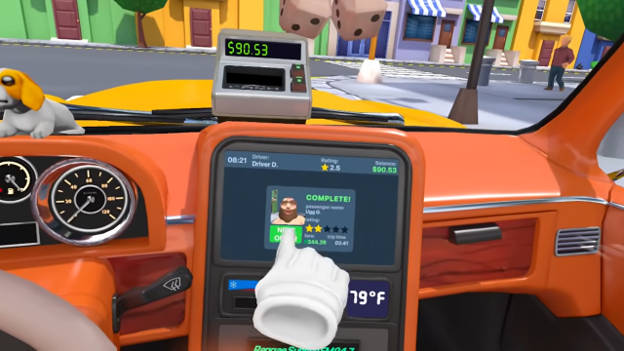
TAXI DRIVER VR, developed by Manerai Inc., places the player in the role of a taxi driver transporting customers around a city.
As shown in Figure 4, although the taxi appears to be moving constantly, the player remains seated and does not physically drive the vehicle. This approach contributes to user comfort by minimizing player movement and reducing the likelihood of motion sickness.
Like Job Simulator, the game replaces controller models with hand models, and interactions are performed through direct physical contact. The environment also makes extensive use of particle effects. For example, food particles scatter while eating, and adjusting the vehicle temperature produces visual effects such as snowflakes, wind, or flames.
I Am Cat – Life as a Cat in VR
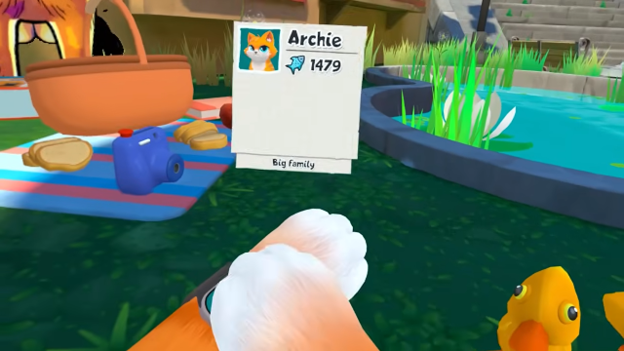
I Am Cat, developed by NEW FOLDER GAMES LTD, allows the user to play as a cat. Instead of human hands, players are represented by cat paws, reinforcing the role-playing experience.
Movement is based on physical actions. Players move forward using scooping motions with the controllers, jump using leap gestures, and climb using both hands as if climbing a ladder in real life.
The environment contains numerous physics-based objects, such as punching bags and flopping fish, with which players can interact. The game also relies heavily on diegetic user interfaces. For example, the task panel appears when the player interacts with a watch attached to their left paw.
Ghost Town: Solving Mysteries on a Foggy Island
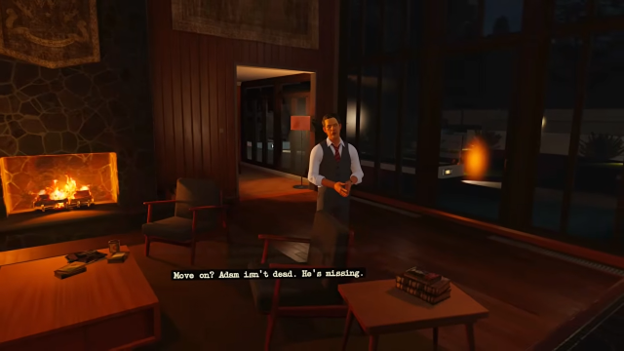
Ghost Town, released by Fireproof Games in 2025, places players on a lighthouse island where they solve mysteries and explore their surroundings.
The game uses realistic hand models instead of controller representations. Interactions are performed through direct physical contact rather than raycast systems. For example, electrical currents are redirected by physically moving switches, doors are opened by pulling or pushing handles, and buttons are pressed manually.
The game also utilizes spatial 3D audio to enhance immersion. Movement is performed using the thumbstick, allowing relatively free exploration of the environment.
Summary of Commercial VR Games
Many of the examined VR applications share similar design principles. Replacing controller models with hand models is common, but from a usability perspective this can pose challenges for first-time VR users. Someone unfamiliar with VR controllers may require time to learn both movement and interaction mechanics.
For this reason, tutorial areas are highly recommended. They allow users to safely learn the controls and become familiar with the interaction methods before entering the main experience.
Game | Observations |
Job Simulator | Direct hand-based interaction and restricted movement create an approachable and comfortable experience. Visual highlight effects clearly indicate interactive objects. |
Taxi Driver VR | Emphasizes responsiveness, interactions with NPCs, and visually exaggerated effects. |
I Am Cat | Movement and gameplay mechanics are built entirely around the character’s physicality, strengthening immersion and role-play. |
Ghost Town | Diegetic user interfaces and realistic object physics contribute to a highly immersive experience. |
Table 1. Observations from Commercial VR Applications
Most VR applications also avoid movement methods that can cause motion sickness. These include relocating the player without warning or without a visual transition. Continuous thumbstick movement can also induce motion sickness, especially among inexperienced users, which is why teleportation and comfort settings are common in many VR applications. Among the examples reviewed, Ghost Town was the only game that allowed relatively unrestricted thumbstick-based movement.
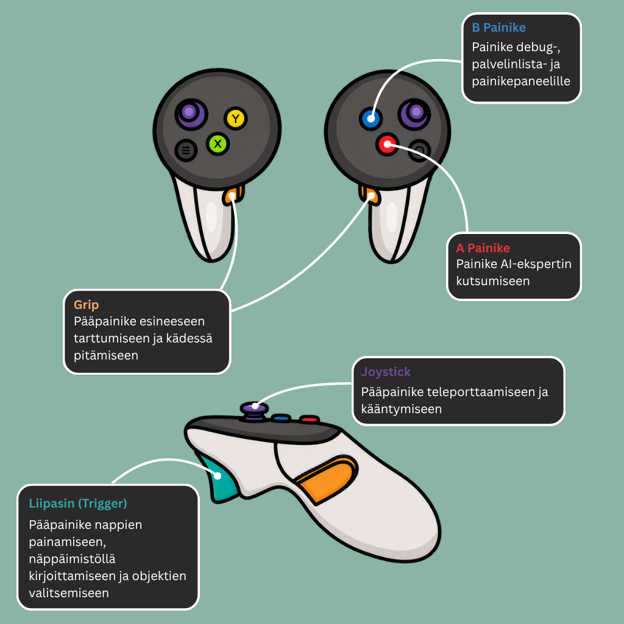
MRI VR takes a different approach by using controller models instead of hand models. This choice makes it possible to color-code controller buttons, helping users understand the available controls more easily. Figure 7 shows an example of this implementation. The color palette was selected to maximize visual distinction and improve accessibility for color-blind users.
How Does the Hardware Affect User-Friendliness?
Several VR hardware manufacturers currently exist, including Sony, Meta, Apple, HTC, Varjo, and Valve. Their products differ in terms of standalone operation, required hardware connections, cost, and intended use.
Although controller layouts are largely similar across manufacturers, the physical appearance of headsets and controllers varies significantly.
Most VR controllers include the following controls regardless of manufacturer:
- Trigger: Located behind the controller at the index finger position. Used for selection, shooting, and menu interactions.
- Grip Button: Located on the side of the controller at the middle finger position. Used for grabbing and holding objects.
- Thumbstick/Joystick: Located on the top of the controller under the thumb. Used for movement and turning.
- Menu/System Button: A small button located on the controller surface. Opens the application menu or the VR system menu.
Some users experience challenges when wearing VR headsets because their prescription glasses do not fit comfortably inside the headset. Certain manufacturers offer prescription lens inserts, which should be considered when selecting VR hardware.Some users experience challenges when wearing VR headsets because their prescription glasses do not fit comfortably inside the headset. Certain manufacturers offer prescription lens inserts, which should be considered when selecting VR hardware.
Another noteworthy difference concerns grip interaction. Valve Index controllers use a pressure-sensitive grip area that detects when users squeeze the controller, whereas Meta controllers and most other VR controllers use a dedicated grip button. Preferences vary between users, but applications emphasizing realistic object handling can particularly benefit from the Valve Index grip system.
Summary
Based on the reviewed examples, the key characteristics of a user-friendly VR application are:
- Motion sickness reduction through appropriate movement solutions
- Clear tutorials and guidance systems
- Diegetic user interfaces
- Natural interaction with the environment
- Effective use of haptic feedback and physics
The purpose of these design choices is to create VR experiences that are easy to learn, enjoyable to use, and immersive, even for first-time users.
Applying the Principles in the DTRIP4H MRI VR Application
The MRI virtual environment developed by FrostBit incorporates numerous user-friendly design principles.
One example is the use of color-coded controllers. By pressing the B button, players can instantly open a control reference panel displaying all available controller functions (Figure 7). This reduces cognitive load for new users by making controls immediately accessible without requiring memorization. All buttons are also color-coded to improve accessibility for users with color vision deficiencies.
Both Job Simulator and Taxi Driver VR limit the player’s physical movement within the virtual environment. In MRI-VR, a similar goal is achieved through a teleportation system in which the screen briefly fades to black during movement. The user selects a destination using the thumbstick, after which the view is darkened and then restored once the transition is complete. This solution is designed to minimize the risk of motion sickness.
The application also makes extensive use of diegetic user interfaces, meaning that instructions and information are integrated directly into the environment. Guidance panels and maps help players understand what they should do at each stage of the experience.
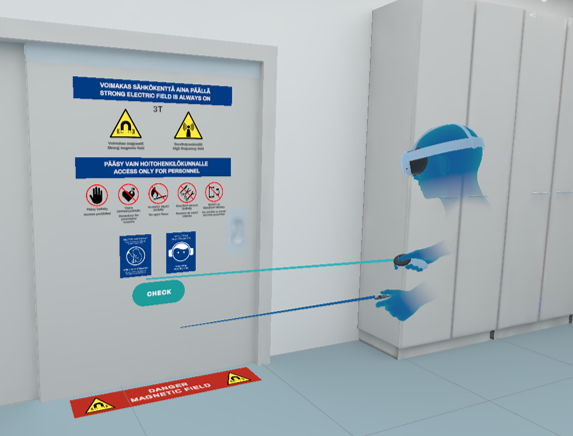
Both I Am Cat and Ghost Town make extensive use of interfaces that are integrated into the game world itself. MRI-VR applies the same principle to its safety-related tasks. For example, the warning signs placed on the MRI room door function both as a user interface element and as an educational tool. In real MRI facilities, such warning signs are permanently displayed to inform personnel and visitors about the magnetic field and prohibited items, including mobile phones and other ferromagnetic objects (Figure 8).
The MRI VR application also includes a tutorial that teaches players common VR actions, such as teleportation, pressing buttons, and picking up objects. Object interaction has been simplified so that users can point at an object, press the grip button, and have the object automatically transfer into their hand. This makes interactions easier for users who are unfamiliar with VR environments.
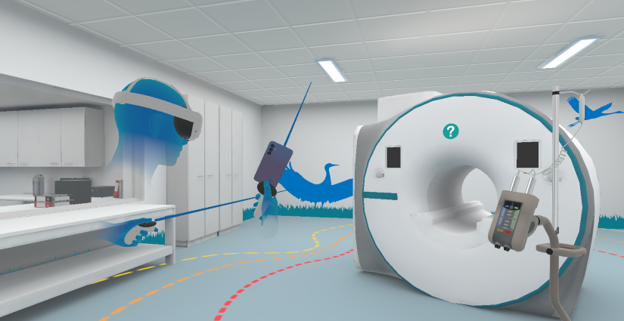
In many of the VR applications examined, interaction is reinforced through physics, audio cues, and visual feedback. Similar principles are applied in the first MRI-VR scenario, where users are introduced to the different MRI safety zones and complete a series of safety-related tasks designed to teach the key considerations involved in working in an MRI environment.
One of these tasks allows users to experiment with different objects and observe how they react to the MRI scanner’s magnetic field (Figure 9). When a ferromagnetic object is brought close to the scanner, the controller begins to vibrate, providing haptic feedback. As the object gets closer, it is pulled from the user’s hand and launched toward the MRI scanner. Sound effects, such as the loud metallic impact of the object striking the scanner, enhance both the realism and immersion of the experience. In a real-world hazard situation, a ferromagnetic object can be rapidly accelerated by the magnetic field and collide with the MRI scanner with considerable force.
It is therefore essential that VR developers pay careful attention to user-friendly design principles during development. User-friendliness is not merely an additional feature in VR applications; it is the foundation of a successful user experience. Clear controls, well-designed interfaces, and solutions that reduce motion sickness make applications easier to learn and encourage users to return to them in the future.
About the Project
DTRIP4H is an EU-funded Horizon Europe project involving 26 partners from 15 countries. The project has a total budget of €12 million and runs from 31 December 2024 to 31 December 2028.

Sources
Job Simulator | Full Game Walkthrough | No Commentary 2022. 99TH VR. 04.09.2022. Accessed 10.09.2026. https://www.youtube.com/watch?v=1KsLr6pQzdo&t=5824s
Ghost Town | Full Game Walkthrough | No Commentary 2025. 99TH VR. 26.04.2025. Accessed 10.09.2026. https://www.youtube.com/watch?v=czC4YUyoexw
I Am Cat | All Locations | Full Game Walkthrough | No Commentary 2026. 99TH VR. 24.01.2026. Accessed 10.09.2026. https://www.youtube.com/watch?v=zkS4ujvEvfg
TAXI DRIVER VR | Full Game Walkthrough | No Commentary 2026. 99TH VR. 02.06.2026. Accessed 10.09.2026. https://www.youtube.com/watch?v=K-gmhXBLaBg
FrostBit 2026. MRI VR Training. Accessed 18.09.2026. https://www.frostbit.fi/en/portfolio/dtrip4h/
Jyväskylän ammattikorkeakoulu 2023. Laajennettu todellisuus (XR) – kattokäsite erilaisten todellisuuksien yhdistelmille. Accessed 10.09.2026. https://oppimateriaalit.jamk.fi/fi/kexri2/monialaista-xr-osaamista-opas-laajennettuun-todellisuuteen/peruskasitteet/laajennettu-todellisuus-xr-kattokasite-erilaisten-todellisuuksien-yhdistelmille/
Meta 2017. Developer Perspectives: Job Simulator. Meta Horizon Blogs. Accessed 10.09.2026. https://developers.meta.com/horizon/blog/developer-perspectives-job-simulator
Rudnäs, N. 2019. Mitä on eXtended Reality (laajennettu todellisuus)? SEAMK Julkaisut. Accessed 10.09.2026. https://lehti.seamk.fi/alykkaat-ja-energiatehokkaat-jarjestelmat/mita-on-extended-reality-laajennettu-todellisuus/
The article publications are written by the professionals at FrostBit, related to the activities and results of the projects, as well as on other topics related to RDI activities and the ICT sector. The articles are evaluated by FrostBit’s publishing committee.

Sofie Väisänen
Sofie Väisänen, an expert and Bachelor of Science in Information and Communications Technology, works in the Digital Solutions competence group at Lapland University of Applied Sciences.